Edit the text. Add your signature. Black out private details. Ask what a letter wants from you. The everyday paper jobs, without the printer or the scanner.
Mac and Windows. Nothing leaves your computer unless you use Shared AI.
Try it on this letterFive tools to try
tenancy-renewal.pdf1 page
HARBOUR LANE LETTINGS03 NOVEMBER 2026 BRISTOL, UK
Tenancy renewal · Flat 2, 9 Mill Road
Another year at Mill Road.
Dear Alex,
Your tenancy ends on 31 January 2027.To stay another twelve months, please sign and return this letter by 15 December 2026.
The rent will be £1,150 a month from 1 February 2027.You will a copy of the new agreement within ten working days.
If you plan to leave instead, give us two months’ notice in writing.
Rent collected from
Your signature
Sample document · Made-up details01
EditHighlightRedactSignAsk
Pick a tool. Nothing is uploaded: the letter is an example.
01 Everyday tools work offline02 Your original stays intact03 Mac and Windows · iPhone & iPad in beta
The jobs you came to do
A PDF. A few changes. Then back to your day.
Start with the task. Each one saves a trip to the printer, the scanner or someone who “knows computers”.
01Edit the words.
Click a paragraph and type. TidyPaper writes it back in the page's own font, at the same size and letter spacing, so nobody can tell it was changed. Even headings in design-program fonts.
Wraps and justifies the lines to fit the original box
Tells you if the page's font is missing a letter you typed
Leaves the words around it exactly where they were
P2 series for high-power SMPS
Enabling superior telecomnetwork applications
Rated for continuous operation from −40 °C to 125 °C, with the lowest switching losses in its class.
Gotham Light · 21.64 pt · spacing keptFits the original box
02Sign and fill in.
Add a drawn, typed or photographed signature. Save your name, address and numbers once, and on the next form TidyPaper finds the matching boxes, even on paper-style forms with “Name: ____”. It shows you every match before anything is filled, and one Undo puts it all back.
Your details are kept encrypted on your computer
Signature, initials on every page, ticks, crosses and today's date
Digital signatures that seal a document, and a check for ones you receive
Full name
Address
Phone
Date of birth
4 boxes match your saved details
03Remove private details.
Before you send a bank statement or a payslip, TidyPaper finds the private numbers for you. Tick what goes and it's removed from the file itself, not just covered with a black box someone could lift off.
Card and bank numbers are checked, so it doesn't guess
Email, phone, National Insurance and NHS numbers
Your own saved details, wherever they appear
Card4929 1840 3321 7716
NI numberQQ 12 34 56 C
Phone07700 900461
Balance£2,418.06
04Understand the document.
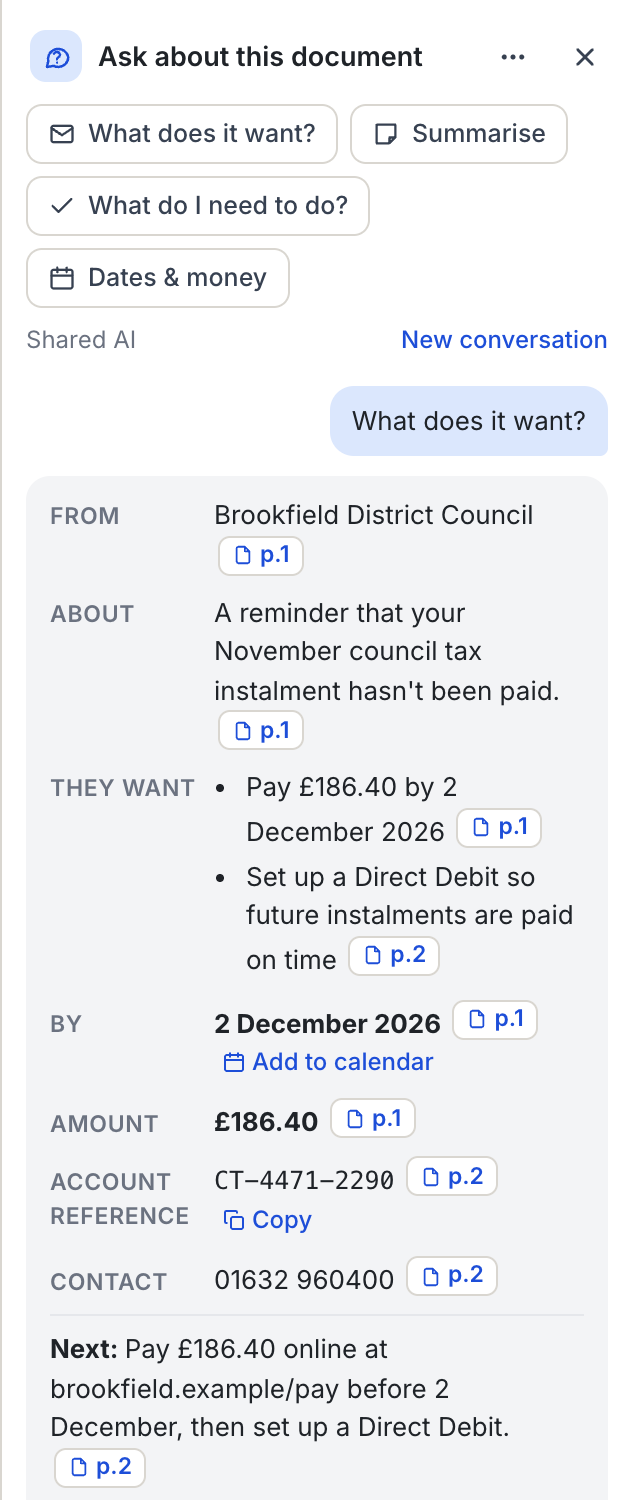
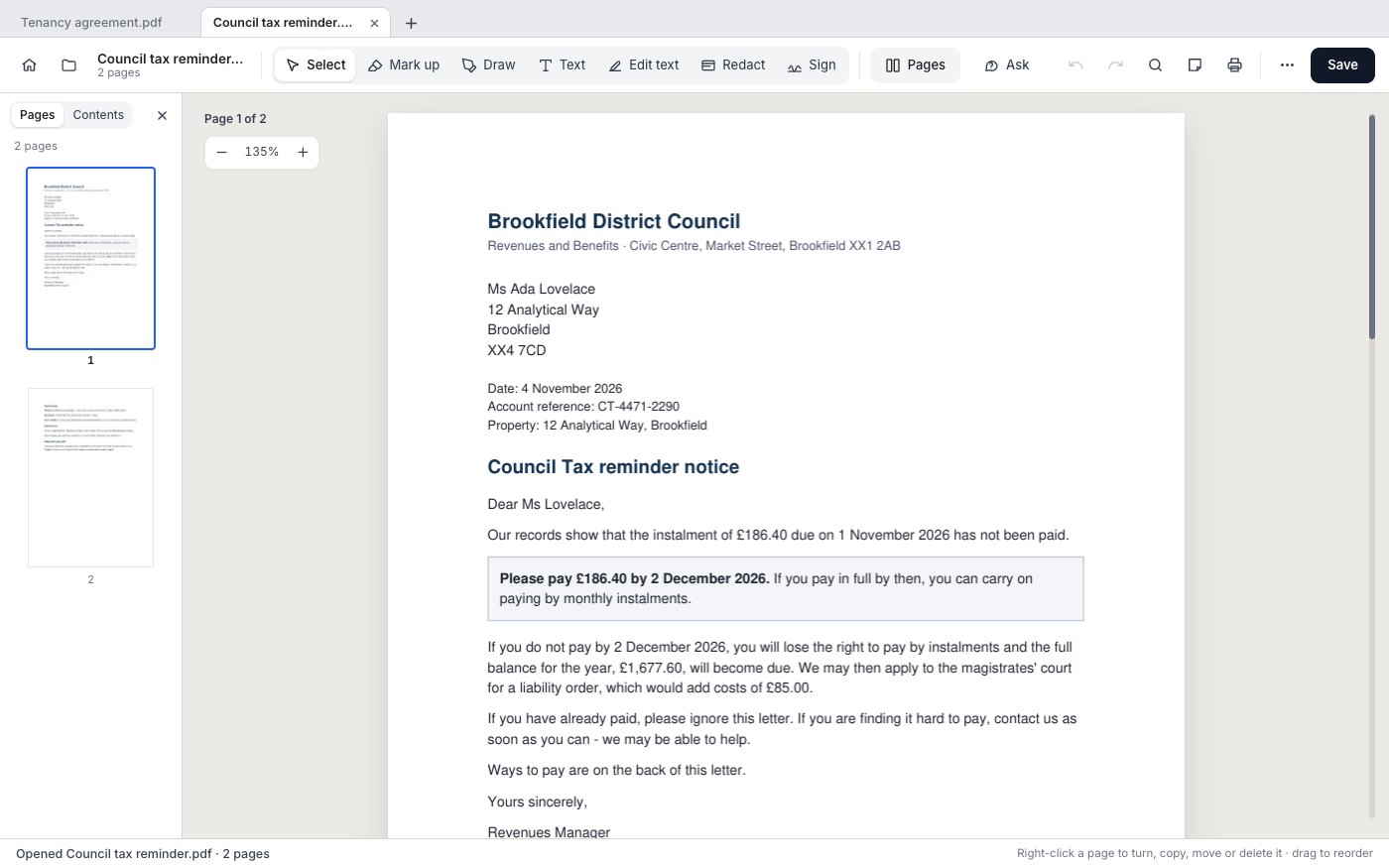
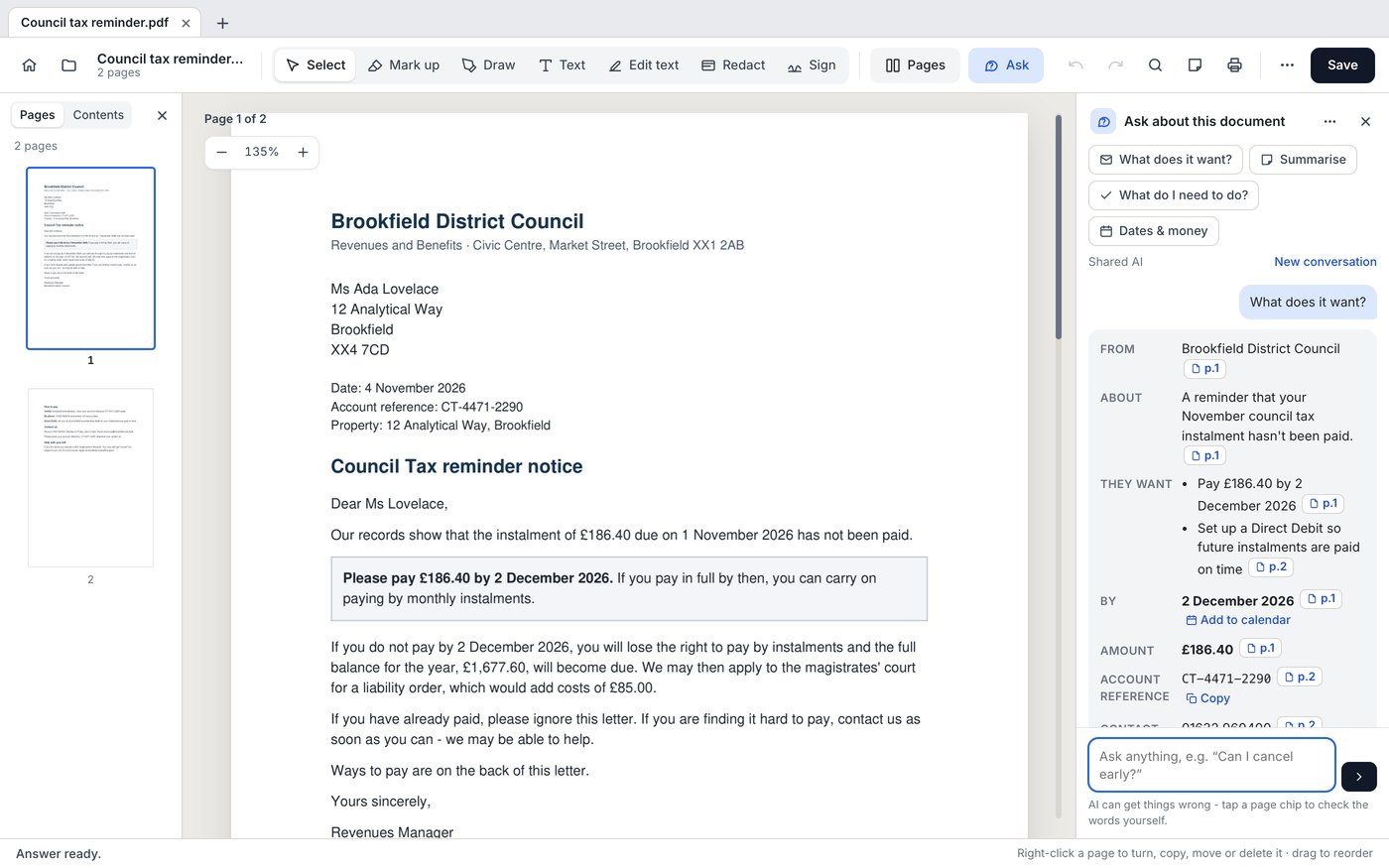
One tap gives a letter's card: who it's from, what they want you to do, by when, how much, and the reference to quote. Amounts, dates and references are checked against the letter itself, and anything that isn't there is flagged. Add the deadline to your calendar in one click. Long contracts get a plain summary, and letters in another language are translated beside the original, page by page.
What does it want?, Summarise, Dates & money, or your own question
Only the pages that matter are sent, and you see what goes first
Uses Shared AI, which is optional and by invitation for now
Originalp.1
Ihr Mietvertrag endet am 31. Januar. Bitte unterschreiben Sie die Verlängerung bis zum 15. Dezember.
Englishp.1
Your tenancy ends on 31 January. Please sign the renewal by 15 December.
05Get the data out.
Bank statements, invoices and price lists come out as rows you can check, edit and save as an Excel, CSV or JSON file. Tables in typed PDFs can be pulled out on your computer with nothing sent. Scans use Shared AI, a few pages at a time.
Check every row against its page before you save
Works on scans as well as typed PDFs
Invoice 2041 Brightwell Supplies
Printer paper A4 ×10£42.50
Toner, black£68.00
Lever-arch files ×12£21.60
Delivery£6.95
Item
Qty
Amount
Printer paper A4
10
42.50
Toner, black
1
68.00
Lever-arch files
12
21.60
Delivery
1
6.95
Saved as Invoice 2041.xlsx
06Scan with your phone.
No scanner? Scan the QR code on your computer's screen with your phone, photograph each page, and the pages appear on the computer straight away, cleaned up to look like a scan. The words in them can be selected and copied too.
Works over your home Wi-Fi, no app to install on the phone
Photos and scans become one tidy PDF, smaller for email if you like
Scan this with your phone's camera. Pages appear below as you take them.
07Combine. Convert. Compress.
Bring PDFs together, turn Office files or photos into a PDF, reorder pages, and make a file smaller for email.
Word, Excel and PowerPoint files to PDF
Turn, move, copy and delete pages
Password-protect a PDF, or remove a password
Inside TidyPaper
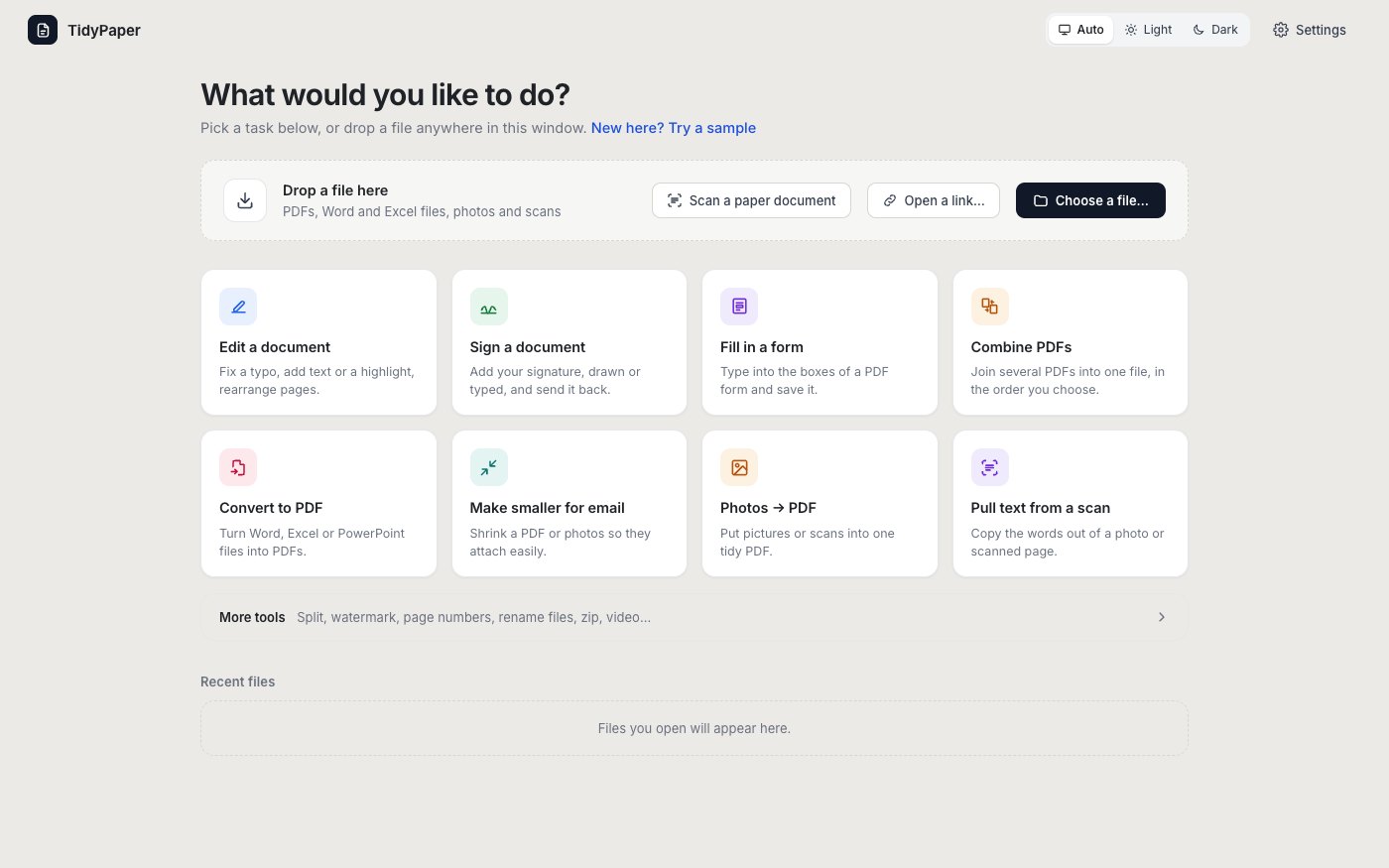
Open the file. Pick the job.
The home screen lists jobs, not menus. Drop a file on it and it suggests what fits. Every result is saved next to the original with a clear name, so the file you started with is never changed.
TidyPaper / The real app
Pick a job, or drop any PDF, Word or Excel file, photo or scan on the window.Mac + Windows
And everything else you'd expect.
Sign & fill in
Drawn, typed or photographed signature
Initials on every page
Type into any form box
Ticks, crosses and dates
Save a final copy
Fix & mark up
Edit text in its own font
Highlight, notes and drawing
Add text and pictures
Turn, move, copy, delete pages
Dark pages for night reading
Make & send
Combine PDFs
Word, Excel, PowerPoint to PDF
Photos and scans to PDF
Make smaller for email
Password-protect, or remove one
Understand
Ask, with page links
Translate beside the original
Tables into Excel, CSV or JSON
Copy words from scans
Several documents open in tabs
Where your files go
Usually? Nowhere.
Switch it on to see what leaves your computer when you ask a question.
On your computer
The everyday work stays local.
Signing, filling in, editing, combining and blacking out all happen on your own computer. Nothing is uploaded, and it all works offline.
Optional Shared AI
Only when you choose it.
Ask, Translate and Pull out data from scans use Shared AI, which is off until you join with an invitation. When you use it, only the pages the job needs are sent, through a relay in London that keeps no copy of your questions, documents or answers.
Windows 10 or 11. Right-click any PDF and choose Edit with TidyPaper. The first time, Windows may say it protected your PC: choose More info, then Run anyway.
Scan paper with the camera, sign, fill in, combine and translate. Open a PDF from Mail or Files and send it to TidyPaper. Several documents open at once on iPhone, side-by-side windows on iPad.
Testers join by invitation through Apple's TestFlight. The App Store version follows the beta.
Before you go.
Do my documents get uploaded?
Not unless you use Shared AI. TidyPaper works on your computer. Words leave it only when you use Ask, Translate or Pull out data from a scan, and then only the pages that job needs. You're shown what will be sent the first time. The privacy policy lists everything that leaves your device and what's kept.
Will it change my original file?
Never. Your work is saved beside it with a clear name: Lease.pdf stays as it was and Lease_edited.pdf has your changes.
Is blacking out really removing it?
Yes. Redact takes the words out of the file itself, so they can't be copied, searched or uncovered later.
What is Shared AI?
The optional helper behind Ask, Translate and Pull out data. It's off until you join with an invitation, and everything else in TidyPaper works without it. It runs on Google Cloud in London, passes your pages to the AI service and keeps no copy of them.
Is the letter at the top a real PDF?
No. It's an example with made-up details, so you can try the tools without uploading anything. Download the app to work on your own documents.
Can I get it on my iPhone or iPad?
It's in private beta. Testers get it by invitation through Apple's TestFlight app, and the App Store version follows.
Windows says it protected my PC. Is that normal?
Yes, for a new app. Choose More info, then Run anyway. The install guide shows each step with pictures.
Who makes TidyPaper?
Tekvibes Limited, in the UK. Questions, problems or ideas: hello@tidypaper.io.